CS II Lesson 2
Professor Abdul-Quader
Input/Output
Exercise
- Create a new Java Project (either in IntelliJ or VSCode)
- Write a program that creates variables named hour and minute. Assign values that roughly correspond to the current time (use a 24 hour clock so 2pm should be 14 hours).
- Output the current time in one line, including a message. For example:
The current time is 12:30.Continued
- Modify the program so it also displays the time 55 minutes from now (hint: you may need to use the remainder operator %). For example:
The current time is 12:30.
In 55 minutes, it will be 13:25.- Test your program out by changing the number of minutes to add.
- If you coded it right, you should be able to change that number in just one part of your code!
- And it should continue to work fine!
- (Or we discover a bug, and we can fix it!)
If Statement
- Issue: 30 + 35 = 65. 1 hour and 5 mintues
- 10:30 + 35 minutes = 11:05, not 11:5!
- Fix? Either:
- if statement
- printf format string (see chapter 3 for details)
Last time
- Variables?
- Data types?
- Memory diagrams!
- Questions (any exercise)?
Characters and Strings
The char data type represents single characters. A single character literal is written with single quotes around it.
Strings
The String data type can be used to represent longer text. String literals are written with double quotes around them.
String Concatenation
Strings can be concatenated with the + operator:
Strings can be concatenated with data of other types:
Confusion
This can cause some confusion. Java reads the operation left-to-right. Can you guess what is outputted in the following two lines?
System Class
- Java provides several standard libraries:
- Packages and classes that are useful for all programmers regardless of their particular need.
- Example:
Systemclass.
System.outis a variable inside theSystemclass.- Its type is
PrintStream.PrintStreamhas several methods for outputting, includingprintlnandprintf.
Navigating in IntelliJ
- We can navigate Java libraries using IntelliJ.
- Try holding down the COMMAND key ⌘, and clicking on
System.out. - Useful tool when we are working with libraries that we don’t know fully well.
We can also view information about Java standard libraries online: search for “java PrintStream” for example.
Scanner Input
We use the Scanner class for input:
Questions
- Purpose of import statement?
- Purpose of new keyword?
Exercise
Write a program that asks a user to input their height in inches, and then displays their height in standard form (feet and inches).
For example, if the user types in 70, we should convert that to 5’10".
Scanner API
- nextInt, nextDouble, nextLong
- next: reads the next “token” (until whitespace, by default), store as a String
- nextLine: reads the entire next line (until a newline), store as a String
- hasNextInt, hasNextDouble, hasNextLine: check if there is more input
hasNextInt may be useful for us in combination with if and while statements
Scanner Pitfall
Scanner sc = new Scanner(System.in);
System.out.println("Enter your age: ");
int age = sc.nextInt();
System.out.println("Enter your name: ");
String name = sc.nextLine();
System.out.println("Hi " + name + ", you are " + age + " years old!");
What happens?
Explanation
- Scanner object parse input as tokens, not as entire lines.
- nextInt: parses all of the input up until the end of the integer.
- “enter” key (newline) not processed by nextInt
- newline processed by nextLine
Fix? Call nextLine after every group of nextInts.
Fix
Java Structure
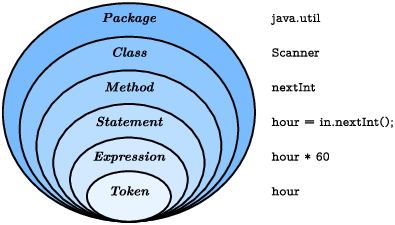
Structure
- Packages (java.util) group related classes
- classes (Scanner) contain methods (and more…)
- methods: named sequences of statements
All code goes inside a method!
Exercise
Write a program that prompts a user for the amount of money they make per hour and the number of hours they worked, and outputs how much money they made in those hours. For the sake of simplicity, you can assume that the rate and the number of hours are integers.
Upcoming
- Read Chapter 3, if you haven’t already.
- Read Chapter 5 on conditionals and logical symbols.
- Read Chapter 6 on loops (for and while)
- Monday: asynchronous / small groups (10-12 students, not everyone).
- Quiz 1: online
- will be posted tomorrow on BrightSpace
- 20 minutes
- includes material from next lesson
Preview
What does the following code snippet do?
Scanner sc = new Scanner(System.in);
System.out.println("n?");
int n = sc.nextInt();
int x = 1;
for (int i = 0; i < n; i++) {
  x *= 2;
}
System.out.println(x);
Make a memory diagram to figure it out.